Showing posts with label DVD. Show all posts

Tuesday, January 20, 2015


The Optical Disk Drives are used to read or write various types of data to Optical Disks such as CD, DVD, Blu-ray etc. Optical Drives need to be connected to the PATA (Parallel AT Attachment)/IDE (Integrated Drive Electronics) port or the SATA (Serial AT Attachment) ports. PATA/IDE technology is now ancient, so the modern day drives use SATA ports instead of PATA/IDE. Only if you have a drive which was made before the year 2003 then you'll need to connect that drive to the big fat PATA/IDE port. This article will explain the ways of connecting a Opticle Disk Drive to a Desktop PC.


Connecting an Optical Disk Drive Using PATA/IDE Port:


1. Detect the PATA/IDE port.


2. Get a PATA/IDE cable.


3. Insert the drive into the Computer Case.

4. Attach it firmly with the case with two screws.

5. Connect One end of the cable to the drive and the other end to the Motherboard.

6. Grab a Power Cable of the Power Supply.


7. Connect it with the power port of the Optical Drive.

Connecting an Optical Disk Drive Via SATA Port:

1. Insert the drive in the PC case.

2. Attach it with the case with screws.

3. Find the SATA Ports on the Motherboard.


4. Get a SATA Data Cable.


5. Connect One end of the cable to the drive and the other end to the Motherboard.

6. Get a SATA Power Cable.


7. Connect its fat end to a power cable from the power supply.

8. Connect the thin end with the drive.

9. Done.

Friday, January 2, 2015


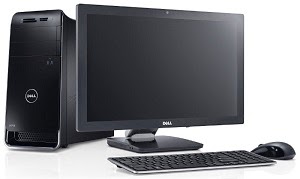
First step of building a PC is collecting the required parts. Here is what you need to assemble a desktop computer:-


1. Case - A case is needed to set all the devices of the computer in it.

2. Power Supply Unit (PSU) - To supply power to the devices of the computer we need a Power Supply. If you buy a case it will probably have a built in PSU in it. You can work with it with a less powerful PC. But for a much powerful PC you will have to buy a PSU of greater Watt.

3. Motherboard - Motherboard is the main circuit board of a computer which connects the other devices.


4. Processor (CPU) - The Central Processing Unit works as the brain of a computer. All the computations are done by it.


5. Random Access Memory (RAM) - RAM is used to temporarily store programs which are currently running.


6. Storage Devices - For storing data for a long time we need storage devices. We can either use Hard Disk Drive (HDD) or Solid State Drive (SSD).


7. Optical Disk Drive - CD, DVD or other optical devices are read or written by the optical disk drives.


8. Keyboard - Keyboard is used for giving input by typing.


9. Mouse - Mouse is needed for giving commands by clicking.


10. Printer - For printing documents.


11. Scanner - Used for scanning documents.


12. Graphics Card (GPU) - Graphical Processing Unit is needed for high quality graphical output.


13. Operating System Disk - You'll need an OS disk to install the Operating System which will run the computer.


14. Monitor - We can see graphical representation of our work in the monitor. There are many types of monitor. Most common are: CRT, LCD and LED.


15. Speaker - This is where we hear the sounds from.


This is almost everything you'll need to assemble a complete PC. There are some optional devices like Floppy disk, Sound Card, TV Card etc.