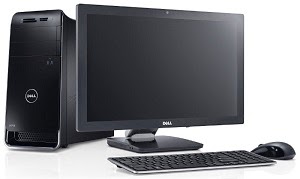
First step of building a PC is collecting the required parts. Here is what you need to assemble a desktop computer:-
1. Case - A case is needed to set all the devices of the computer in it.
2. Power Supply Unit (PSU) - To supply power to the devices of the computer we need a Power Supply. If you buy a case it will probably have a built in PSU in it. You can work with it with a less powerful PC. But for a much powerful PC you will have to buy a PSU of greater Watt.
3. Motherboard - Motherboard is the main circuit board of a computer which connects the other devices.
4. Processor (CPU) - The Central Processing Unit works as the brain of a computer. All the computations are done by it.
5. Random Access Memory (RAM) - RAM is used to temporarily store programs which are currently running.
6. Storage Devices - For storing data for a long time we need storage devices. We can either use Hard Disk Drive (HDD) or Solid State Drive (SSD).
7. Optical Disk Drive - CD, DVD or other optical devices are read or written by the optical disk drives.
8. Keyboard - Keyboard is used for giving input by typing.
9. Mouse - Mouse is needed for giving commands by clicking.
10. Printer - For printing documents.
11. Scanner - Used for scanning documents.
12. Graphics Card (GPU) - Graphical Processing Unit is needed for high quality graphical output.
13. Operating System Disk - You'll need an OS disk to install the Operating System which will run the computer.
14. Monitor - We can see graphical representation of our work in the monitor. There are many types of monitor. Most common are: CRT, LCD and LED.
15. Speaker - This is where we hear the sounds from.
This is almost everything you'll need to assemble a complete PC. There are some optional devices like Floppy disk, Sound Card, TV Card etc.