Showing posts with label GPU. Show all posts

Thursday, January 22, 2015


A Computer can process Graphical Data even without a Graphics Card. Intel and AMD Processors (CPU) have the capability of processing certain amount of Graphical Data. But for high level Graphical Performance a GPU is needed. If you want to use your PC for playing high quality modern day Videogames or Graphical Animations then go ahead and buy a GPU from AMD or nVIDIA. The Graphics Cards connect to the PCI Express Slot of the Computer Motherboard. Remember that PCI Express and PCI Slots are different. Click here to know about using PCI slots. Here's an explanation of how to connect a GPU in a Desktop PC Motherboard:


1. Buy a Graphics Card.

2. Locate the PCI Express x16 Slot of the Motherboard.


3. Remove the barriers of the Computer Case beside the slot.

4. Grab and align the GPU properly with the slot.

5. Insert the GPU in the slot.

6. Attach the GPU with the PC Case with a screw.

7. Done.


Friday, January 2, 2015


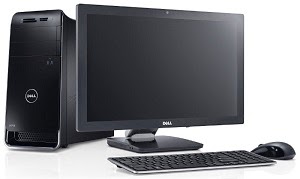
First step of building a PC is collecting the required parts. Here is what you need to assemble a desktop computer:-


1. Case - A case is needed to set all the devices of the computer in it.

2. Power Supply Unit (PSU) - To supply power to the devices of the computer we need a Power Supply. If you buy a case it will probably have a built in PSU in it. You can work with it with a less powerful PC. But for a much powerful PC you will have to buy a PSU of greater Watt.

3. Motherboard - Motherboard is the main circuit board of a computer which connects the other devices.


4. Processor (CPU) - The Central Processing Unit works as the brain of a computer. All the computations are done by it.


5. Random Access Memory (RAM) - RAM is used to temporarily store programs which are currently running.


6. Storage Devices - For storing data for a long time we need storage devices. We can either use Hard Disk Drive (HDD) or Solid State Drive (SSD).


7. Optical Disk Drive - CD, DVD or other optical devices are read or written by the optical disk drives.


8. Keyboard - Keyboard is used for giving input by typing.


9. Mouse - Mouse is needed for giving commands by clicking.


10. Printer - For printing documents.


11. Scanner - Used for scanning documents.


12. Graphics Card (GPU) - Graphical Processing Unit is needed for high quality graphical output.


13. Operating System Disk - You'll need an OS disk to install the Operating System which will run the computer.


14. Monitor - We can see graphical representation of our work in the monitor. There are many types of monitor. Most common are: CRT, LCD and LED.


15. Speaker - This is where we hear the sounds from.


This is almost everything you'll need to assemble a complete PC. There are some optional devices like Floppy disk, Sound Card, TV Card etc.